Intro
Let me be honest with you. A few months ago, I was drowning in WhatsApp messages. Customers asking the same questions. Orders getting lost. I felt like a bad restaurant owner with a broken phone line.
Sound familiar?
You’re not alone. That’s why I started looking for a better way. And that’s when I found Messagenal.
In this Messagenal guide, I’ll walk you through what it is, how to set it up, and which features actually help. No tech jargon. Just what works.
What Exactly Is Messagenal? (The Simple Meaning)
Messagenal is a WhatsApp Business API platform. Think of it as your command center for bulk messaging, automation, and team chats—all inside WhatsApp.
You know how regular WhatsApp Business has limits? Can’t send bulk messages, can’t add multiple agents, can’t automate much.
Messagenal fixes that.
It connects to WhatsApp’s official API. So you stay compliant while scaling your conversations. I’ve seen small e‑commerce stores and big coaching businesses use it to save hours every week.
In plain English: It turns WhatsApp into a real business tool.
How I Realized I Needed Messagenal
Last year, a client named Sarah messaged me at 11 PM. “Hey, did you get my order?” I had missed it. Three days earlier.
I felt awful.
Her order was stuck in a forgotten DM. That’s when I knew my “reply when I can” system was broken. I needed automation without losing the human touch.
That’s the sweet spot Messagenal lives in.
Setting Up Messagenal (Step‑by‑Step)
You don’t need a developer. I promise. Here’s how I did it in under an hour.
Step 1: Sign Up for Messagenal
Go to their website. Click “Start Free Trial.” Use your work email.
Step 2: Connect Your WhatsApp Number
You’ll need a phone number not already registered with WhatsApp Business. A new SIM works fine.
Messagenal walks you through the API request. It takes about 10 minutes. WhatsApp reviews and approves it.
Step 3: Verify Your Business
Have your business registration ready. Messagenal’s support team helped me here—they replied within 20 minutes.
Step 4: Add Team Members
Invite your support or sales team. Each gets their own login. No more sharing one phone.
Step 5: Create Your First Broadcast
Go to “Campaigns” > “New Broadcast.” Upload a CSV of customer numbers. Write your message. Send.
That’s it. The whole process feels like setting up an email tool, not a coding project.
Key Features You’ll Actually Use
Let’s skip the fluff. Here’s what I use every week.
Bulk Messaging Without Getting Banned
WhatsApp hates spam. But Messagenal uses the official API, so your messages land in the inbox—not the spam folder.
You can send thousands of messages at once. Promotions, order updates, appointment reminders.
Real example: A bakery client sends “fresh croissant alert” every Saturday morning. Open rate? 85%.
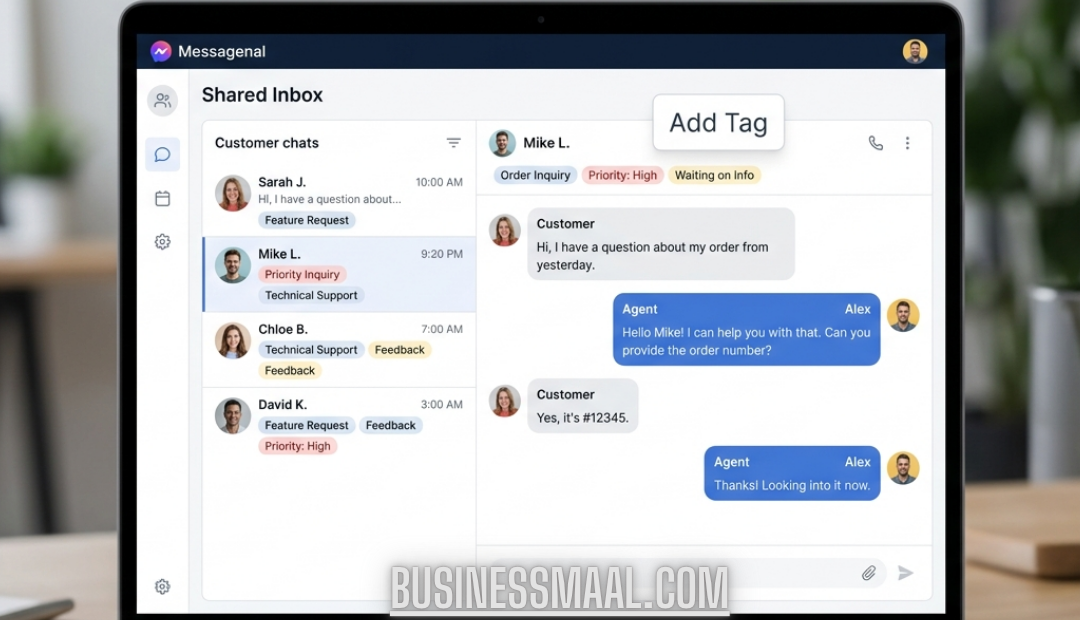
Shared Team Inbox
Everyone sees the same conversations. If I start a chat, my VA can finish it. No “who’s typing?” confusion.
You can also assign tags like “refund” or “lead.” Then filter later. Super handy.
Automated Replies (Not Just “Thanks for contacting us”)
You can build simple chatbots. For example:
Customer types “price”
Bot sends your pricing PDF
If they say “buy,” bot hands off to a human
I set up a “store hours” auto‑reply in 3 minutes. Saved me 20 DMs a day.
Templates That Don’t Feel Robotic
WhatsApp requires approved templates for business messages. Messagenal helps you create and submit them.
Pro tip: Keep templates short and personal. “Hey {name}, your order #{order} is out for delivery” works way better than corporate speak.
Analytics That Make Sense
You see delivered, read, and replied rates. No weird graphs. I check mine every Monday to see what’s working.
Pricing – Is It Worth It?
Messagenal isn’t free. But neither is your time.
Plans usually start around $49/month for small teams. You pay extra for high volume (like 10k+ messages).
Compared to hiring a full‑time chat person? It’s a steal.
They have a 14‑day free trial. No credit card required for some plans. That’s how I tested it first.
My take: If you send more than 500 customer messages a month, it pays for itself in saved hours.
Real Talk: What I Don’t Love
I always keep it real with you.
Approval takes time. WhatsApp can take 2–5 days to approve your API access. Plan ahead.
No mobile app yet. Desktop only. I hope they change this.
Learning curve for advanced automations. Basic stuff is easy. If you want complex chatbots, watch their video guides.
But overall? The pros crush the cons.
Messagenal vs. Other Tools
You might have heard of WATI or respond.io. They’re good too.
What I like about Messagenal: cleaner interface and faster support. I once got a reply on a Sunday. That never happens with bigger companies.
If you just need bulk messaging, any tool works. But if you want a shared inbox + automation + bulk sends in one place, Messagenal is a solid pick.
Quick Tips From My First 3 Months
Here’s what I learned the hard way so you don’t have to.
Start with one automation. Don’t build 10 bots on day one. Just set up “after‑hours” auto‑reply.
Clean your contact list. Old numbers hurt your delivery rate. Remove bounces every month.
Use the “notes” feature for internal team chats. You can add a note on a customer conversation that only your team sees. Great for tracking issues.
Test every template on yourself first. Send it to your own WhatsApp before blasting 500 people.
Conclusion
Look, you didn’t start your business to become a full‑time WhatsApp typist. You started it to do work that matters.
Messagenal helped me get back hours every week. My response time went from 5 hours to 12 minutes. And my customers noticed.
So here’s what I’d do if I were you:
Sign up for the free trial. Connect one number. Set up one auto‑reply. Send one test broadcast.
That’s it. You’ll know within a week if it’s for you.